Creating a dance class and filming a tutorial video are two separate skills — and most instructors try to do both at once. That's where things fall apart. The classes that perform best on video are ones that were fully planned before the camera turned on. Here's how to do it right.
Step 1: Plan the Class Before You Touch the Camera
The single biggest mistake instructors make is treating the video as the plan. They press record, improvise the choreography, and hope it comes together. It rarely does.
A class that works on video needs:
- A defined structure — warm-up, main block, cool-down with clear time allocations
- A fixed move list — every combination named and sequenced before filming
- A music selection locked in — BPM, style, and song order decided ahead of time
For structure guidance based on class length, see how to structure a 60-minute Zumba class or how many moves a 45-minute class should have.
Step 2: Build Your Class in Offbeat
Tools like Offbeat let you map the entire class before you ever leave your desk. In the example below, we built a 45-minute Beginner Zumba class — "Zumba Fiesta Básica – Beginner Latin Groove" — from scratch in a few minutes.
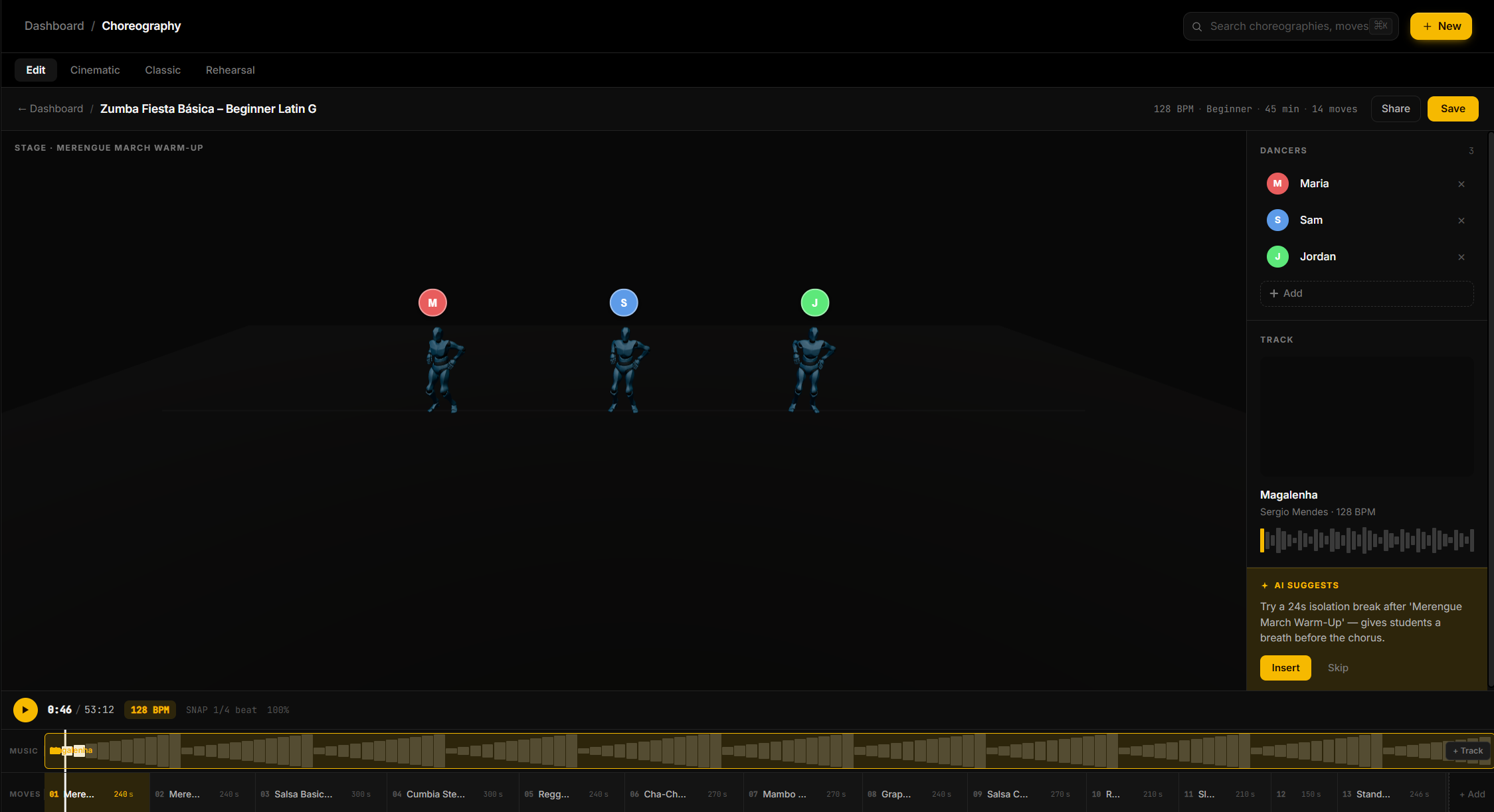
The class was generated with:
- 14 sequenced moves from Merengue warm-up → Salsa → Cumbia → Reggaeton peak → Cool-down stretch
- A 5-song playlist (Magalenha, Danza Kuduro, La Bicicleta, and more) ordered by BPM
- Verbal cues pre-written for every single move — ready to read straight from the screen while you film
Having the move list and cues in front of you while filming means you never lose your place mid-take. No more stopping to remember what comes next.
Write out the class in order:
- Song title + BPM for each segment
- Move name and which counts it starts on
- Formation — where are you and your students standing?
- Transition cues — what you say to bridge from one move to the next
Step 3: Choose the Right Space and Setup
The physical setup matters more than production quality. Viewers will forgive a phone camera. They won't forgive an instructor who's hard to see or hear.
Space:
- Solid-colored background or clean wall — complex backgrounds are distracting
- Enough room to show your full body, including footwork
- Camera position: slightly elevated (not floor level), angled so your feet are always visible
Audio:
- Music at 60–70% of your normal class volume — the mic will pick it up louder than it sounds live
- Test with a 30-second clip before recording the full class
- If your music cuts out, students lose the timing — don't adjust volume mid-take
Lighting:
- Natural light from a window in front of you (not behind — that creates silhouette)
- Avoid overhead-only lighting; it creates harsh shadows on your face
Step 4: Mirror or Face-Forward?
This is the first decision most instructors get wrong for video. In a live class, you typically face away or mirror. On video, always mirror.
Students watching a tutorial follow the screen like a mirror. If your right arm goes up, they expect to raise their left. If you face the camera and lift your actual right arm without mirroring, they get confused.
Set the expectation in your intro: "I'm mirroring you the whole time — my right is your right on screen."
Step 5: Teach Slower Than You Think You Need To
Video removes all the social cues students use in a live class — they can't watch someone next to them, they can't ask you to repeat a count, they can't make eye contact for reassurance.
Compensate by:
- Breaking each move into two passes: first at half-speed, then at performance tempo
- Counting out loud for the first four counts of every new sequence
- Naming the move before you demonstrate it, not after
For detailed cuing technique, see verbal cues for fitness instructors.
Step 6: Structure the Video Itself
A tutorial video isn't just a class recording. It has its own structure:
| Section | Length | What to Cover | |---------|--------|---------------| | Intro | 30–60s | Class name, duration, fitness level, what students need | | Warm-up overview | 1–2 min | Briefly preview what's coming | | Main content | 80% of runtime | Teach each move with slow + full-speed passes | | Cool-down | 5–8 min | Guide explicitly — don't fade out | | Outro | 30s | What to practice, where to find more classes |
Skip the long preamble. Students click away in the first 30 seconds if you don't get to movement quickly.
Step 7: Film in Segments, Not One Take
Even experienced instructors don't record a 60-minute class in a single unbroken take. Film in blocks:
- Warm-up as one clip
- Each major move sequence as its own clip
- Cool-down separately
This makes it easy to re-record a single section without starting over. When editing (even basic editing in a phone app), cut between segments — the small jump cut actually helps students reset mentally between new content.
For the Zumba class we built above, that means 4 separate recordings: the Merengue warm-up block, the Salsa/Cumbia mid-section, the Reggaeton peak block, and the cool-down stretch sequence.
Step 8: Watch It Back Before Publishing
Watch your full video before posting it anywhere. Specifically check:
- Footwork visibility — if your feet go off-screen at any point, you'll need to reshoot that segment
- Audio sync — especially if you're using a separate music track in editing
- Transition cues — do you actually say what comes next before it happens, or after?
- Pacing — is there any 30+ second segment where nothing new is happening?
Most issues become obvious in the first watchback. Fix them before students encounter them.
The Class Creation Checklist
Before you film anything, confirm:
- [ ] Class duration and structure written out (use Offbeat to generate the full move list)
- [ ] Full move list in order with verbal cues for each move
- [ ] Music selected and tested at recording volume
- [ ] Space cleared, lighting tested, camera framed
- [ ] 30-second test recording reviewed
- [ ] Intro and outro scripted (even loosely)
A class you've mapped completely before filming will take half as long to record and need far less editing. The hour you spend in planning saves three hours at the camera.